
You installed OPNsense and traffic flows. Now you want to actually control what goes through it — block specific sites, stop clients from bypassing your DNS, see hostnames instead of raw IPs in the logs, and apply category-level blocking for gambling, malware, and torrent sites.
This post approaches DNS enforcement with a production-grade mindset: multiple defense layers, no single point of bypass, and verified results at each step. The same principles are used in enterprise networks — the implementation here is adapted for a homelab scale.
Follow-up to OPNsense on Proxmox: Build a Dedicated Home Firewall. OPNsense must be installed with a working WAN and LAN before starting here.
Environment: OPNsense 26.1.2, Unbound DNS Resolver, LAN subnet 10.10.1.0/24.
How Blocking Works on OPNsense
Normal Traffic Flow (No Blocking)
Before adding any rules, understand what happens when you open a browser and type reddit.com:

- Your browser asks OPNsense’s Unbound to resolve
reddit.com - Unbound returns the real IP (
151.101.1.140) - Your browser opens a TCP connection to that IP on port 443 (HTTPS)
- OPNsense’s firewall allows the packet and NATs it out the WAN
- Reddit responds and the page loads
Every step succeeds because nothing is blocking. Now look at where each defense layer intercepts this flow.
Six Defense Layers
Each layer targets a different step in the flow above. They are grouped into three categories:
Layers 1–3: Blocking — what to block and how
| Layer | What it does | When it acts |
|---|---|---|
| Layer 1: DNS Override | Returns 0.0.0.0 for blocked domains via Unbound | At DNS resolution time, before any connection |
| Layer 2: Firewall Alias | Blocks packets to specific IPs (resolved from domain aliases) | After DNS resolution, at connection time |
| Layer 3: Block External DNS | Drops all port 53 traffic to anything except OPNsense | When a client tries to bypass Unbound |
Layers 4–5: Anti-Bypass — close escape routes
| Layer | What it does | When it acts |
|---|---|---|
| Layer 4: Block DoT | Drops all port 853 traffic (DNS-over-TLS) | When a client tries encrypted DNS bypass |
| Layer 5: Block DoH | Drops port 443 to known DoH providers (Cloudflare, Google) | When a client tries DNS-over-HTTPS bypass |
Layer 6: Automation — scale blocking with feeds
| Layer | What it does | When it acts |
|---|---|---|
| Layer 6: DNSBL | Auto-blocks thousands of domains from maintained feeds (ads, malware, gambling) | At DNS resolution time, same as Layer 1 |
Normal DNS flow (through OPNsense):
- Client asks Unbound to resolve
reddit.com - Layer 1 + 6 check: Unbound looks for a DNS override or DNSBL match — if found, returns
0.0.0.0→ blocked- If no match, Unbound resolves normally and returns the real IP → client connects → packet passes through the firewall
- Layer 2 check: Firewall compares the destination IP against blocked aliases:
- If match → drops packet
- If no match → traffic reaches the internet
Bypass attempts:
- Client sends DNS query directly to
8.8.8.8on port 53 - The packet must pass through OPNsense’s firewall to leave the LAN
- Layer 3 check: Firewall sees port 53 to a destination that is not
10.10.1.3→ drops packet - Layer 4 check: Client tries DoT on port 853 → blocked
- Layer 5 check: Client tries DoH on port 443 to known providers → blocked
All six layers are complementary. Apply them together for defense in depth.
1. Block a Specific Website
This section implements Layer 1 (DNS Override) and Layer 2 (Firewall Alias) from the diagram above. Both layers reinforce each other — the DNS override blocks by name, the firewall alias blocks by IP.
Layer 2 — Block via Firewall Alias
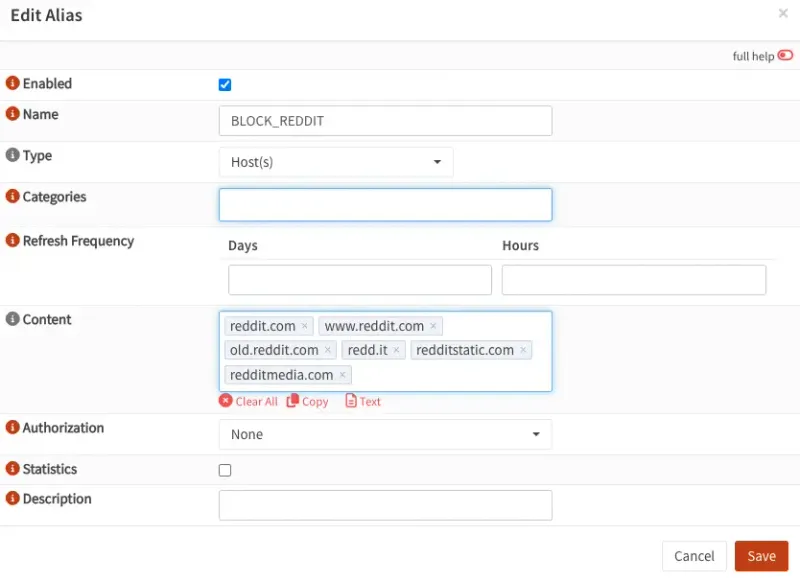
Step 1 — Create the Alias
Navigate to Firewall → Aliases → click +:
| Field | Value |
|---|---|
| Name | BLOCK_REDDIT |
| Type | Host(s) |
| Description | Block Reddit on LAN |
In the Content field, add all domains the site depends on — the main domain alone is not enough for CDN-backed sites:
reddit.com
www.reddit.com
old.reddit.com
redd.it
redditstatic.com
redditmedia.com
Click Save → Apply changes.
Including asset/CDN domains (redditstatic.com, redditmedia.com) is what makes this work. Blocking only reddit.com leaves CDN endpoints open and the site partially loads. For other sites, open DevTools → Network tab to identify which domains the page calls.
Step 2 — Create the Block Rule
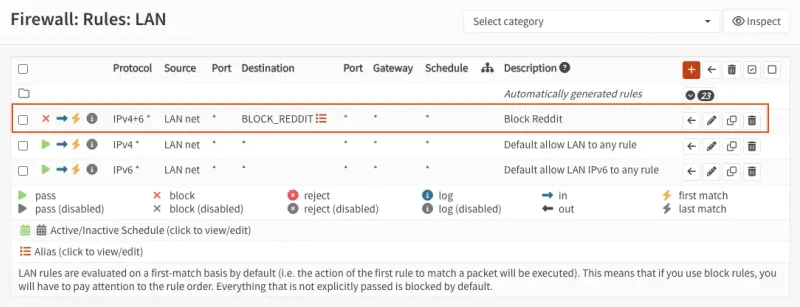
Navigate to Firewall → Rules → LAN → click +:
Set Action to Block, Interface to LAN, Direction to in, TCP/IP Version to IPv4+IPv6, and Protocol to any.
For Source, select LAN net. For Destination, select the BLOCK_REDDIT alias.
Description: Block Reddit from LAN
Move this rule above your default allow rules — OPNsense evaluates rules top-down and stops at the first match.
Click Save → Apply changes.
This approach relies on DNS resolution to populate the alias IPs. OPNsense refreshes them on its own schedule. A client that cached an IP before the rule was added may still connect until that cache expires (typically under 5 minutes).
Layer 1 — Block via DNS Override
This intercepts the domain at DNS resolution time, before any connection attempt. Use it alongside Layer 2 for a deeper block.
- Navigate to Services → Unbound DNS → Overrides → Host Overrides → click +:
- Set Host to
*, Domain toreddit.com, Type toA, and IP to0.0.0.0 - Description:
DNS block — reddit.com - Repeat for each domain in the alias. Click Apply once when done
When a client resolves any of these domains, Unbound returns 0.0.0.0 — the browser gets a non-routable address before even attempting a connection.
Verify it works:
nslookup reddit.com
Server:		10.10.1.3
Address:	10.10.1.3#53

Name:	reddit.com
Address: 0.0.0.0
OPNsense’s unbound answered with 0.0.0.0 - The block is working. Now test what happens if a client bypasses OPNsense:
nslookup reddit.com 1.1.1.1
Server:		1.1.1.1
Address:	1.1.1.1#53

Non-authoritative answer:
Name:	reddit.com
Address: 151.101.1.140
Name:	reddit.com
Address: 151.101.65.140
Name:	reddit.com
Address: 151.101.193.140
Name:	reddit.com
Address: 151.101.129.140
Interesting, the real IP comes back, Any client with a hardcoded DNS server (1.1.1.1, 8.8.8.8) completely sidesteps Unbound and your LAN block rules.
The next section fixes this by forcing all DNS queries through OPNsense regardless of what the client has configured.
2. Block External DNS (Layer 3)
This implements Layer 3 (Block External DNS) from the architecture diagram. DNS blocking only works if clients use OPNsense as their resolver. Any client with 8.8.8.8 or 1.1.1.1 hardcoded bypasses your Unbound rules entirely. The fix: a firewall rule that drops all port 53 traffic leaving your LAN to anywhere except OPNsense.
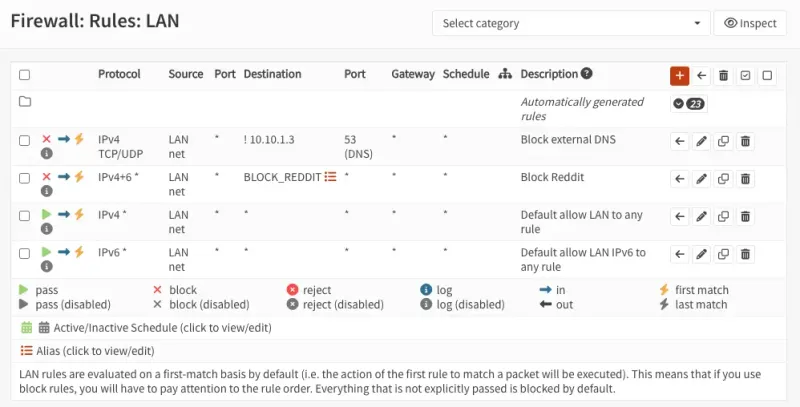
- Navigate to Firewall → Rules → LAN → click +
- Set Action to
Block, Interface toLAN, Direction toin, TCP/IP Version toIPv4+IPv6, and Protocol toTCP/UDP - For Source, select
LAN net - Destination — you want to block DNS to anywhere except OPNsense itself. Check Invert (the
!checkbox next to Destination), then set Destination to Single host or Network →10.10.1.3. The invert makes the rule read: block port 53 to anything that is not10.10.1.3 - For Destination port, set From and To to
53 - Description:
Block external DNS - Click Save → Apply changes
Go to Firewall → Rules → LAN and drag this block rule above your default “Allow LAN to any” rule. OPNsense evaluates rules top-down and stops at the first match — if the allow rule is above, the block never fires.
Verify the Intercept Works
# Query an external DNS server — should now time out
nslookup reddit.com 8.8.8.8Some browsers (Chrome, Firefox) support DNS-over-HTTPS (DoH) and bypass local DNS entirely. Disable DoH in browser settings, or add a firewall rule blocking outbound TCP port 443 to known DoH providers (1.1.1.1, 8.8.8.8, 9.9.9.9).
nslookup reddit.com 8.8.8.8
;; connection timed out; no servers could be reached

nslookup reddit.com 1.1.1.1
;; connection timed out; no servers could be reached
External DNS is now blocked. Queries to OPNsense still resolve — and return 0.0.0.0 for blocked domains:
nslookup reddit.com
Server:		10.10.1.3
Address:	10.10.1.3#53

Name:	reddit.com
Address: 0.0.0.0
OPNsense replied with 0.0.0.0 — the DNS block is working and cannot be bypassed by pointing at an external resolver.
Now that everything is set up, let’s remove the rule blocking reddit.com 🙂
3. Block DoT — Layer 4 (Port 853)
DNS-over-TLS (DoT) is another way clients can bypass your local DNS. It encrypts DNS queries over port 853, making them invisible to Unbound. Block it at the firewall.
- Navigate to Firewall → Rules → LAN → click + (add to top)
- Set Action to
Block, Interface toLAN, Direction toin, TCP/IP Version toIPv4+IPv6, and Protocol toTCP - For Source, select
LAN net. For Destination, selectany - For Destination port, set From and To to
853 - Description:
Block DNS over TLS (DoT) - Click Save → Apply changes
- Verify DoT is blocked:
openssl s_client -connect 1.1.1.1:853Expected output — connection times out:
error:8000003C:system library:BIO_connect:Operation timed outConfirm normal DNS still works:
nslookup google.com
Server:		10.10.1.3
Address:	10.10.1.3#53

Non-authoritative answer:
Name:	google.com
Address: 142.250.198.206
Your device is using OPNsense (10.10.1.3) as DNS. DNS enforcement is working — port 53 is locked down, and DoT is blocked.
4. Block DoH — Layer 5 (Known Providers)
DNS-over-HTTPS (DoH) sends DNS queries over port 443 — the same port as regular HTTPS traffic. This makes it impossible to block all DoH with a single port rule. However, blocking known DoH provider IPs still covers the most common bypass attempts.
Create the Alias
- Navigate to Firewall → Aliases → click +:
- Set Name to
DOH_SERVERS - Set Type to
Host - Set Description to
Known DoH providers - In the Content field, set it as text and paste:
1.1.1.1
1.0.0.1
8.8.8.8
8.8.4.4- Click Save
Create the Block Rule
- Navigate to Firewall → Rules → LAN → click + (add to top)
- Set Action to
Blockand Protocol toTCP - For Source, select
LAN net. For Destination, select theDOH_SERVERSalias - For Destination port, set From and To to
443 - Description:
Block DoH (known providers) - Click Save → Apply changes
After saving, go to Firewall → Rules → LAN and verify the order from top to bottom:
- Block DoH (443 → DOH_SERVERS)
- Block DoT (853)
- Block external DNS (53)
- Allow LAN to any
OPNsense evaluates top-down. If the allow rule is above any of these, the block never fires.
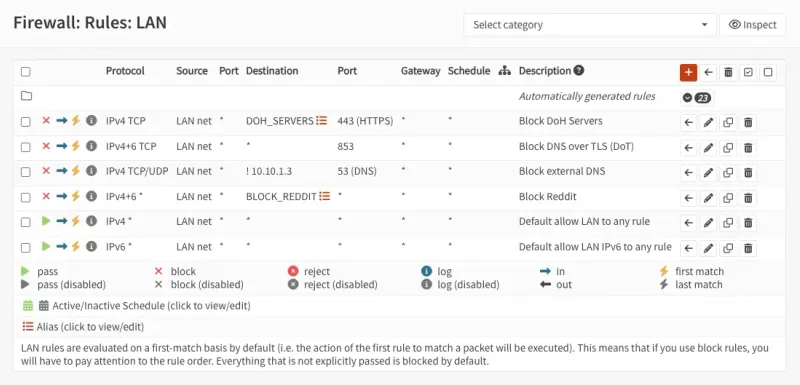
This is partial protection — it blocks the most common DoH providers (Cloudflare, Google) but cannot catch every DoH server on the internet since they all use port 443. For broader DoH blocking, consider using category-based DNSBL lists that include known DoH endpoints.
5. Category-Based DNS Blocking with DNSBL — Layer 6
Blocking individual sites by hand doesn’t scale. DNSBL (DNS Block List) solves this — instead of manually adding one domain at a time, Unbound downloads large community-maintained blocklists and automatically blocks ads, trackers, malware, and any custom domains you add. OPNsense has DNSBL built in, no extra packages needed.
Step 1 — Enable DNSBL
- Navigate to Services → Unbound DNS → Blocklist and check Enable
- Choose your blocklist sources. OPNsense ships with a large set of maintained lists. Pick based on what you want to block:
| List | Purpose |
|---|---|
| [hagezi] Multi LIGHT | Basic protection — good starting point |
| [hagezi] Multi NORMAL | All-round protection, recommended for most setups |
| [hagezi] Multi PRO | Extended protection, more aggressive |
| [hagezi] Multi ULTIMATE | Maximum blocking — may break some sites |
| Steven Black List | Ads, trackers, and malware combined |
| [hagezi] Threat Intelligence Feeds | Known malware and phishing domains |
| [hagezi] Gambling | Gambling sites |
| [hagezi] DoH/VPN/TOR/Proxy Bypass | Blocks known bypass infrastructure |
| [hagezi] Anti Piracy | Torrent and piracy sites |
| EasyList / EasyPrivacy | Ad and tracker lists (browser-level equivalents) |
Start with [hagezi] Multi NORMAL and Steven Black List. These cover ads, tracking, and malware without being too aggressive. Add stricter lists if you want more control, but test after enabling each one — overly aggressive lists can block legitimate services.
Configure the remaining fields:
- Allowlist Domains — domains that should never be blocked, even if they appear in a feed (supports regex)
- Blocklist Domains — exact domain matches to always block (your manual additions)
- Wildcard Domains — blocks a domain and all its subdomains (e.g.
reddit.comblocksold.reddit.com,www.reddit.com, etc.) - Source Net(s) — apply the policy only to specific subnets, or leave empty to apply to all LAN traffic
Click Save → Apply.
Step 2 — Add Custom Block Domains
Use Wildcard Domains to block a site and all its subdomains at once:
reddit.com
redd.it
redditstatic.com
redditmedia.com
Click Save → Apply.
Wildcard Domains is more powerful than Blocklist Domains for site blocking — reddit.com in Wildcard Domains will also catch old.reddit.com, www.reddit.com, and any future subdomains automatically. Blocklist Domains requires an exact match per entry.
Step 3 — Restart Unbound
Navigate to Services → Unbound DNS → General and click Restart. This forces Unbound to reload with the updated blocklists.
Verify Blocking Works
nslookup doubleclick.net
Server:		10.10.1.3
Address:	10.10.1.3#53

Name:	doubleclick.net
Address: 0.0.0.0

nslookup ads.google.com
Server:		10.10.1.3
Address:	10.10.1.3#53

Name:	ads.google.com
Address: 0.0.0.0

nslookup tracking.facebook.com
Server:		10.10.1.3
Address:	10.10.1.3#53

** server can't find tracking.facebook.com: NXDOMAIN

nslookup ad.doubleclick.net
Server:		10.10.1.3
Address:	10.10.1.3#53

Name:	ad.doubleclick.net
Address: 0.0.0.0
Ad and tracking domains resolve to 0.0.0.0 or return NXDOMAIN — both mean the connection is dropped before it reaches the internet.
Allowlist Exceptions
If a legitimate domain gets caught by a blocklist, navigate to Services → Unbound DNS → Blocklist → Allowlist → click +:
| Field | Value |
|---|---|
| Domain | legitimate-site.com |
| Type | Domain |
What You Now Have
Your OPNsense is now enforcing DNS at six layers with no single point of bypass:

Summary of what’s in place:
Blocking (Layers 1–3):
- Layer 1: DNS Override — Unbound returns
0.0.0.0for manually blocked domains - Layer 2: Firewall Alias — blocks by IP, catches traffic that bypasses DNS
- Layer 3: Block External DNS — port 53 to non-OPNsense destinations dropped
Anti-Bypass (Layers 4–5):
- Layer 4: Block DoT — port 853 blocked, no DNS-over-TLS bypass
- Layer 5: Block DoH — port 443 to known providers blocked
Automation (Layer 6):
- Layer 6: DNSBL — category blocklists for ads, malware, gambling, and custom domains
Is this enterprise-grade?
The layered approach mirrors what enterprise networks do — defense in depth, DNS enforcement, multiple bypass paths closed. For a homelab or small office it is production-grade.
What enterprise setups add on top:
| Gap | Enterprise solution |
|---|---|
| DoH on unknown servers (port 443) | SSL inspection / TLS MITM proxy |
| Per-user policies | LDAP / Active Directory integration |
| Centralized audit logs | SIEM (Elasticsearch, Splunk) |
| Threat response | IDS/IPS with Suricata (next post) |
You have the foundation. The next layer is intrusion detection.
For locking down OPNsense itself — admin interface restrictions, SSH hardening, automatic updates, and Suricata — continue to OPNsense Hardening: Lock Down Your Firewall After Install.